

I made $11 in my first month trying to figure out the best digital products to sell online for passive income. Eleven dollars. I remember checking my Gumroad dashboard about six times a day, convinced the number was going to magically jump to something respectable, and it just sat there mocking me.
That product was a Notion template for meal planning. I’d spent two weeks building it, convinced it was going to be my ticket to “passive income” the way every YouTube thumbnail promised. What actually happened was a slow, humbling lesson in what “passive” really means, and it’s not what most of those videos show you.
Two years later, digital products bring in a real chunk of my monthly income, somewhere between $800 and $2,500 depending on the month. Not life-changing, but consistent, and it genuinely does run while I sleep now. It just took me way longer to get there than any of those “passive income in 30 days” posts led me to believe.
If you’re thinking about getting into this, let me walk you through what actually sells, what flopped for me, and what I’d do differently if I started over today.
Why ‘Passive Income’ Is a Lie for the First

Let’s get this out of the way because it annoyed me so much when I was starting out.
Nothing about launching a digital product is passive at the beginning. You’re designing it, testing it, figuring out where to sell it, writing copy for the sales page, and then marketing it constantly because nobody knows it exists yet.
The “passive” part kicks in later, once you’ve got something that’s actually selling and you’re not rebuilding it every week. My meal planning template didn’t become passive until about month four, once I’d fixed the formatting issues, added testimonials, and started getting a slow trickle of organic traffic from Pinterest.
So don’t go in expecting to set something up on a Tuesday and wake up rich on Wednesday. It’s more like planting something and checking back in a few months.
What Actually Sold for Me (And What Didn’t)
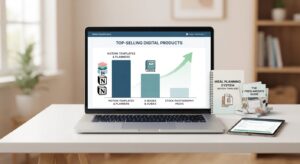
Notion templates. This was my first product and honestly still one of my most consistent sellers. I built templates for meal planning, budgeting, and later a content calendar for small business owners. The content calendar one has sold the best by far, probably because it solves an actual business problem rather than a personal organization one.
Canva templates. I got into this almost by accident after a friend asked me to design her Instagram post templates. I turned around and sold a pack of 20 similar templates on Etsy. This category moves fast because people running small businesses or social media accounts don’t want to design from scratch every time.
Printable planners. These sell surprisingly well but the margins per sale are tiny, usually $3-7 per download. You need volume for this to matter, which means you need serious traffic, usually from Pinterest or Etsy SEO.
A short ebook. I wrote a 40-page guide on meal prepping for people with ADHD (something I have personal experience with, which made the writing genuinely useful instead of generic). This one surprised me by becoming my highest-converting product relative to traffic, even though total sales volume was lower than the templates.
What flopped:* I tried making a stock photo bundle once, thinking it’d be easy passive money. It sold maybe four times total. The market is oversaturated with big established players like Unsplash and Pexels, and I had zero differentiation. Lesson learned — oversaturated categories need a very specific angle to work.
Step 1: Solve a Problem You’ve Actually Had
The templates and guides that sold well for me all came from problems I’d personally dealt with. The ones that flopped were things I made because I thought they’d be popular, not because I understood the audience.
Before building anything, ask yourself what annoying, repetitive problem you’ve solved in your own life that other people probably deal with too. Budgeting struggles, meal planning chaos, disorganized business filing systems, social media content burnout — these are all things regular people wrestle with constantly.
You don’t need to be an expert. You need to have actually lived the problem and found a workable solution.
Step 2: Pick a Format That Matches the Problem
Not every solution needs to be an ebook. Here’s roughly how I think about matching format to problem now:
- Templates (Notion, Canva, Excel/Google Sheets): Best for organizational or repeatable tasks — budgets, planners, content calendars, trackers
- Printables: Great for simple, visual, one-time-use tools — checklists, worksheets, planning sheets
- Short ebooks or guides: Work well when the problem needs explanation, not just a tool — like teaching a process or mindset shift
- Online courses: Best when the problem is complex enough to need multiple steps taught over time, but these take way more effort upfront
- Stock assets (photos, fonts, graphics): Only worth it if you have a genuinely unique style or niche angle, otherwise the market’s too crowded
I wasted time early on trying to force problems into the wrong format when figuring out the best digital products to sell online for passive income. My budgeting content actually works way better as a Google Sheet than it ever would as an ebook, because people want a tool, not a lecture.
Step 3: Where to Actually Sell This Stuff
Etsy. This became my biggest surprise. I assumed Etsy was just for physical crafts, but digital downloads do enormous volume there, especially printables and templates. The built-in search traffic is huge compared to starting from zero on your own website.
Gumroad. Simple, clean, and great for creators who already have some kind of audience (social media, email list, blog) to send traffic to. No built-in discovery though, so it’s all on you to bring buyers.
Etsy plus Pinterest together. This combo has been my most reliable traffic source by far. I pin my printables and templates with keyword-rich descriptions, and Pinterest sends steady organic traffic to my Etsy shop without me actively doing anything most weeks.
Your own website with Shopify or a simple landing page. Once you have consistent sales elsewhere, having your own storefront lets you keep more of the profit since you’re not paying Etsy’s fees. I moved my best-selling template to my own site once it proved itself on Etsy first.
Step 4: Building Your First Product Without Overcomplicating It
Here’s roughly the process I use now, refined after messing it up the first few times.
Start with a rough outline or wireframe. For templates, I sketch out sections on paper first — what does someone actually need to track or plan? For guides, I write a basic outline before touching actual writing.
Build a scrappy version first. My first Notion template took two weeks because I kept perfecting tiny design details nobody cared about. Now I build a functional rough version in a day or two, test it myself for a week using it in real life, then fix what’s actually annoying about it.
Get outside eyes on it before launching. I posted my meal planning template in a small Facebook group for feedback before listing it publicly. Someone pointed out the grocery list section was confusing, which I never would have noticed myself.
Design matters more than you’d think, even for simple products. My early printables looked amateur, using default fonts and clashing colors. Once I started using Canva Pro’s templates as a starting point instead of designing from scratch, sales noticeably improved. People judge digital products by their thumbnail before anything else.
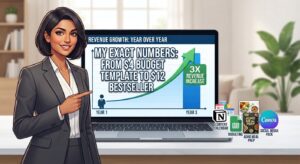
Price based on the problem solved, not the time it took you. I originally priced my budgeting template at $4 because that’s what felt “fair” for the hours I put in. Once I raised it to $12 and added better sales copy explaining exactly what problem it solved, sales barely dipped and revenue nearly tripled.
Real Numbers From My Own Shop
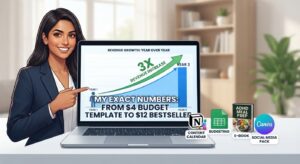
Just so this doesn’t feel vague, here’s a rough breakdown of what’s actually worked, sales-wise, over the past year:
- Content calendar Notion template: consistently my top seller, roughly 15-25 sales a month at $18 each
- Budgeting spreadsheet: steady seller, around 10-15 sales monthly at $12
- ADHD meal prep ebook: fewer sales, maybe 5-10 a month, but priced at $15 with almost no refund requests
- Canva social media template pack: seasonal spikes, does really well in January and September (people restarting their businesses or routines)
None of these are overnight riches. But stacked together, they add up to genuine income that doesn’t require me to be actively working every hour it comes in.
Mistakes That Cost Me Time and Sales
I launched before testing. My very first template had a broken formula in the budget tracker that I didn’t catch until a customer emailed me confused about why her numbers didn’t add up. Mortifying, but it taught me to actually use my own products for at least a week before selling them.
I ignored SEO on Etsy completely at first. My listings had vague titles like “Meal Planner” instead of specific, keyword-rich titles like “Weekly Meal Planning Template for Busy Families – Printable PDF.” Traffic tripled once I fixed my titles and tags to match what people actually search for.
I didn’t create a sales page that explained the actual benefit. My early listings just described what the product was — “20 Canva templates” — instead of what it solved — “stop spending hours designing Instagram posts every week.” Benefit-focused descriptions converted noticeably better.
I made products nobody asked for. The stock photo bundle flop happened because I built something based on what I thought would sell, not based on any actual demand I’d seen. Now I look at what people are asking for in Facebook groups, subreddits, or reviews of competitor products before building anything new.
I underpriced out of guilt. I felt weird charging for something that took me “only” a weekend to make. But customers aren’t paying for your hours, they’re paying for the problem it solves them. A $12 template that saves someone three hours of work is a fair trade regardless of how long it took you to build.
A Quick Example of the Full Process

My content calendar template is the clearest example of this working start to finish. I noticed in a small business Facebook group that people kept complaining about juggling content ideas across sticky notes and random Google Docs.
I built a simple Notion template with sections for content ideas, posting schedule, and performance tracking. Tested it myself for two weeks running my own content. Fixed a few clunky parts based on that experience. Listed it on Etsy with a keyword-heavy title and pinned it on Pinterest with three different pin designs.
It took about six weeks to get its first ten sales, then it started climbing steadily as Pinterest traffic picked up. It’s now been my top seller for almost a year straight, all without me actively promoting it most weeks.
Final Thoughts

Digital products aren’t the get-rich-quick shortcut a lot of content online makes them look like. The early months involve real work — building, testing, fixing, figuring out where your actual audience hangs out.
But once something’s built well and positioned in front of the right people, it really does keep selling with very little ongoing effort. That eleven-dollar first month felt discouraging at the time, but it was really just the cost of learning what actually works before things started compounding.
Start with a problem you’ve genuinely dealt with, keep your first version simple, and don’t be afraid to charge what the solution is actually worth while figuring out what actually sells best digital products to sell online for passive income. The passive part takes patience to get there.
