A few months ago I walked into a nail salon I’d been meaning to try. I’d found it on Google Maps, and I only picked it over three other places because it had 240 reviews, a wall of bright photos, and a “Booking” button that actually worked. The owner told me later that she’d been invisible on Maps for two years. Then a friend sat her down for one afternoon and fixed a handful of things on her listing.
She wasn’t doing anything clever. She simply learned how to rank higher on Google Maps by making better use of a free marketing tool that most of her customers already use.
I’ve helped a few small local businesses with this over the past couple of years, including a family-run bakery, a mobile dog groomer, and a plumbing company with two trucks. Some of what I tried worked well. Some of it was a waste of a weekend. This article is the practical, no-hype version of what I learned.
One honest note up front: nobody can promise you a specific ranking. Google doesn’t publish its formula, results shift depending on where the searcher is standing, and some markets are far more competitive than others. What you can do is improve the factors you control. That’s what the ten tips below are about.
How to Rank Higher on Google Maps: Key Ranking Factors
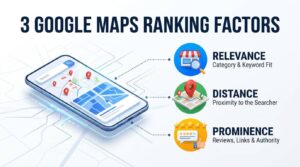
Google has said local results are based mainly on three things:
- Relevance: how well your listing matches what the person searched for
- Distance: how close you are to the searcher or the location they typed in
- Prominence: how well-known and trusted your business appears, based on reviews, links, mentions, and general web presence
You can’t move your building, so distance is mostly out of your hands. Relevance and prominence are where the real work happens.
Also, ranking is personal. Two people searching “plumber near me” from different streets can see different results. So when someone claims “we got you to #1,” ask: for which search, and from where?
Tip 1: Claim and Verify Your Google Business Profile

This is the foundation. Your Google Business Profile is the listing that appears on Maps and in search results. If it’s unclaimed, you have little control over what it says.
Search for your business name, then look for the option to claim or manage it. Follow the verification instructions shown in your Google Business Profile. The available verification methods depend on your business and Google’s eligibility requirements.
Lesson learned: Don’t create a second listing if verification feels slow. The bakery owner I helped did exactly that, and we spent a week merging the mess. Duplicates can split your reviews and confuse Google about which listing is real.
Tip 2: Choose the Right Primary Category

If I could change only one field on a poorly optimized profile, it would be the primary category. It tells Google what kind of business you are, and it carries a lot of weight for relevance.
The plumber I worked with had “Home improvement” as his main category. Technically not wrong, but too vague. We switched to “Plumber” and added secondary categories like “Water heater installation service” and “Drain cleaning service.”
A few rules I follow:
- Pick the most specific category that honestly describes your main business.
- Add secondary categories only for services you truly offer.
- Look at the top-ranking competitors in your area and see which categories they use. Several free browser extensions can display competitors’ categories, or you can inspect them manually.
Don’t add categories hoping to attract unrelated searches. It tends to dilute relevance and can look spammy.
Tip 3: Use Your Real Business Name (No Keyword Stuffing)

This one tempts a lot of beginners. You’ll see competitors with names like “Best Cheap Plumber Dallas 24 Hour Emergency Service.” It’s tempting to copy that.
Don’t. Google’s guidelines say your name should match your real-world branding, such as your sign, stationery, and website. Stuffing keywords into it can get your listing suspended, and getting reinstated is a slow, frustrating process. I’ve seen a business lose weeks of calls over this.
If a competitor is doing it, you can report it through Google’s tools. Whether it gets removed is up to Google, but it’s better than joining them.
Tip 4: Fill Out Every Section of Your Profile

Many profiles I audit look like someone typed in a name and phone number and walked away. Go through every section:
- Hours, including special hours for holidays
- Description, written for humans, not stuffed with keywords or phone numbers
- Services or products, with short, clear descriptions
- Attributes, like accessibility, payment options, or “women-owned” where they apply
- Booking or appointment links, if you take reservations
- Service area, if you travel to customers
Complete profiles tend to get more calls and clicks. Even when it’s unclear how much they directly influence rankings, they help customers decide to contact you, and that’s what counts.
A small mistake that cost real money: the dog groomer had the wrong Saturday hours for almost a year. People showed up to a locked door, and a few left one-star reviews about it. Check your hours now.
Tip 5: Upload Real, Recent Photos
When the nail salon owner started adding photos regularly, her calls picked up noticeably. People judge a business visually before they ever speak to you.
What to include:
- Exterior shots, so customers recognize your building
- Interior photos
- Your team at work
- Your actual products, food, or finished jobs
- A logo and cover photo
Practical tips:
- Use a phone in good daylight. You don’t need a professional photographer.
- Avoid stock photos. They look generic, and customers can tell.
- Add a few new photos every month or two.
- Keep it honest. Don’t use misleading images that don’t reflect your real business.
Tip 6: Build a Steady Stream of Genuine Reviews

If you only have time for one tip on this list, this is probably the one. Review quantity, recency, rating, and the actual content of the reviews all appear to matter, both for rankings and for convincing people to choose you.
The bakery had 18 reviews when we started. We didn’t try to catch up overnight. We built a simple habit instead.
A review routine that worked:
1. In your Business Profile, find your direct review link.
2. Turn it into a QR code and print it on a small card for receipts, bags, or the counter.
3. Send the link by text or email shortly after a successful visit or job.
4. Ask in person too. A simple “It would really help us if you left a review” works better than people expect.
5. Reply to every review, good or bad.
For negative reviews, stay calm and specific. Thank them, acknowledge the issue, and offer to fix it offline. Future customers reading your response often judge you more by how you handled the problem than by the problem itself.
What not to do: Don’t buy reviews, don’t offer discounts or gifts in exchange for them, don’t write your own, and don’t only ask happy customers. Google prohibits these practices, and the penalties can include removed reviews or a suspended profile.
Over five months, the bakery went from 18 reviews to just over 70. Slow, boring, and effective.
Tip 7: Keep Your Name, Address, and Phone Consistent Everywhere
Google cross-checks your information across the web. If your business is “Sunrise Bakery” on Google, “Sunrise Bakery & Cafe” on Facebook, and “Sunrise Bakehouse” on Yelp, with two different phone numbers, you’re creating doubt.
Choose one exact version of your name, address, and phone number (people call this NAP) and use it everywhere. Check:
- Your website footer and contact page
- Facebook, Instagram, LinkedIn
- Yelp
- Bing Places
- Apple Maps, through Apple Business Connect
- Industry-specific directories
- Your chamber of commerce listing
You don’t need to submit your business to hundreds of low-quality directories. That’s an outdated tactic. A dozen accurate, relevant listings beat a hundred junk ones.
Tip 8: Make Your Website Support Your Listing
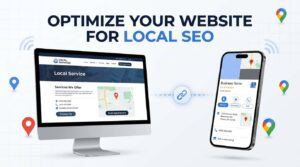
Your website can support your Google Business Profile by providing consistent business information, clear service details, and useful local content. These details help potential customers understand what you offer and where you operate.
For a beginner, here’s what to focus on:
- Clear service pages. One page per main service, with useful, original detail. A plumber might have separate pages for water heater repair, drain cleaning, and leak detection.
- Local context. Mention the neighborhoods or towns you serve naturally, and include local details like projects you’ve done there.
- Contact info. Put your address, phone number, and hours on your contact page, plus an embedded map.
- Mobile-friendliness. Most local searches happen on phones. Test yours.
- Speed. Google’s PageSpeed Insights is free and shows what’s slowing you down.
Avoid creating dozens of near-identical “city pages” where only the town name changes. That approach is thin and doesn’t help real people.
Tip 9: Earn Local Mentions and Links
Prominence isn’t just about reviews. When other local websites mention or link to you, it signals that you’re a real, established business.
Low-cost ways to earn them:
- Sponsor a local youth team or community event
- Join the chamber of commerce or a local business association
- Partner with a nearby complementary business (a wedding photographer and a florist, for example)
- Share a useful tip with a local blogger or newsletter
- Offer a small discount to a local school or nonprofit
The plumber sponsored a youth soccer club for a modest amount. The club listed him on their website with a link, and a few parents hired him. It wasn’t a huge SEO win, but it was real exposure and a genuine connection.
Tip 10: Use Available Profile Features and Track What Works
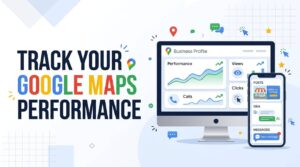
Your Google Business Profile may offer features such as posts, customer reviews, booking links, and a Q&A section, depending on the business and Google’s current offerings. Check your dashboard to see which features are available. Use relevant features to share useful updates, answer common customer questions, and make it easier for potential customers to contact your business.
I’ll be honest: I haven’t seen strong proof that posting weekly will boost rankings. But it keeps your profile fresh, answers customer questions before they ask them, and costs almost nothing. Ten minutes a week is a fair trade.
More important is tracking results. Your Business Profile shows how many people called, requested directions, clicked to your website, or messaged you. I keep a simple spreadsheet with monthly numbers for calls, direction requests, review counts, and average rating. When I make a change, I note the date.
Why this matters: I once changed seven things in a single weekend and had no idea which one helped. Now I make a few changes at a time and write down what I did.
Tools Worth Using

You can do most of this for free:
- Google Business Profile for editing your listing and viewing performance data
- Google Search Console for your website’s search performance
- Google Maps for checking your own visibility from different spots (use a private window and try several locations)
- Bing Places and Apple Business Connect for extra map exposure
- PageSpeed Insights for website speed
- A spreadsheet for tracking progress
Paid tools like BrightLocal, Whitespark, and Local Falcon can show rankings across a grid of locations, which is genuinely useful if you manage several businesses or want detailed tracking. I wouldn’t pay for them until you’ve covered the basics. Check their current features and pricing before committing, because these change.
Common Mistakes to Avoid

Keyword-stuffing the business name. Risky and against guidelines.
Using a fake or virtual address. Listing an address where you don’t actually operate can lead to suspension. Use only a legitimate location, or set up as a service-area business if you travel to customers.
Creating duplicate listings. They create confusion and can split your reviews.
Ignoring reviews. Unanswered reviews, especially negative ones, send the wrong message to potential customers.
Gating or incentivizing reviews. Asking only happy customers, or paying for reviews, breaks the rules.
Expecting fast results. Review growth and reputation take months. I got impatient at week six with one client and nearly undid good work.
Chasing rankings instead of customers. Being #1 for a search nobody makes doesn’t help. Focus on calls, visits, and bookings.
A Realistic Timeline
Here’s roughly how it went for the bakery, which is a typical pattern for small local businesses:
- Weeks 1 to 2: Verified the profile, fixed categories and hours, and added photos.
- Weeks 3 to 8: Started a consistent review routine and cleaned up listings elsewhere.
- Months 3 to 4: Began appearing more often in map results for nearby searches, with more direction requests and calls.
- Months 5 to 6: More stable visibility for several relevant searches, though bigger competitors still won some.
Your timeline will vary. A plumber in a small town will generally move faster than a lawyer in a major city. Be realistic about your competition.
Final Thoughts
The nail salon owner told me something that stuck: “I thought this was going to be complicated. It was just a lot of small things I’d been ignoring.”
That’s been my experience too. There’s no secret trick. The businesses that rise on Google Maps tend to be the ones with accurate profiles, honest reviews, consistent information, and a bit of patience.
If you want a starting point, set aside an hour this weekend. Check your category, fix your hours, and upload ten real photos. Then set up your review link and ask your next customer. Those few actions beat most of what agencies will pitch you.
Frequently Asked Questions

How long does it take to rank higher on Google Maps?
The time it takes to rank higher on Google Maps depends on your location, competition, and the current state of your Google Business Profile. Some businesses may notice improvements within a few weeks after correcting basic issues, while competitive markets may require several months of consistent work. There is no guaranteed timeline for higher rankings.
Can I rank on Google Maps without a website?
Yes, it’s possible, especially for very local searches. But a website helps Google understand your business and gives customers more information, so I’d recommend at least a simple one.
How many reviews do I need?
There’s no magic number. Look at the top-ranked competitors in your area. If they have 150 reviews and you have 12, aim for steady growth rather than a specific target. Recency and quality matter too.
Do negative reviews hurt my ranking?
A few critical reviews among many positive ones are normal and can actually make your profile look more trustworthy. What matters is how you respond. If a review violates Google’s policies, such as being fake or abusive, you can flag it for removal.
Does paying for Google Ads help my Maps ranking?
Ads can place your business in a paid position, but Google has said paying for ads doesn’t directly improve your organic local ranking. Think of them as separate channels.
Can I hide my address if I work from home?
Often yes, if you set up as a service-area business and meet Google’s requirements. Check the current guidelines for your situation, since rules can change.
Should I hire an agency?
Not necessarily. Many beginners can handle the basics themselves. If you do hire someone, be wary of guarantees like “#1 in 30 days,” ask for specifics, and make sure they follow Google’s guidelines. You should retain ownership of your own profile.
Do photos and posts really affect rankings?
Evidence on the direct ranking effect is limited, but they influence how many people click, call, and visit. Better engagement is a good outcome regardless.
What if my listing gets suspended?
Read the notice, review Google’s guidelines, fix the issue (often the name, address, or category), and submit a reinstatement request through your profile. Be patient, and avoid creating a new listing, which usually makes things worse.
How often should I update my profile?
Check it monthly. Update hours for holidays, add fresh photos, respond to reviews promptly, and confirm that your information is still accurate.
