
What Is SEO? complete beginner guide 2026
Have you ever written something you were genuinely proud of, clicked the publish button, and then waited… only to realize that almost nobody saw it?
If you are currently asking what is SEO,
I know that feeling because I have been there.
When I started my first blog, I believed that writing a good article was enough. I spent hours researching, editing every sentence, and making everything look perfect. After publishing, I checked my website several times a day, expecting visitors to appear out of nowhere.
Nothing happened.
Days turned into weeks, and my articles barely received any traffic. At first, I thought my writing wasn’t good enough. Later, I discovered the real reason behind this issue.
Google simply didn’t know my website existed.
That was the first time I heard about SEO.
At first, it sounded complicated. Everywhere I looked, people were talking about backlinks, keywords, crawling, indexing, domain authority, and dozens of technical terms that made no sense to me.
The truth is, learning what is SEO isn’t as confusing as many people make it sound.
Once I understood the basics of what is SEO, everything became much clearer. Instead of guessing what to write, I started creating content that people were already searching for on Google. Slowly, my articles began appearing in search results, and traffic kept growing month after month.
If you are new to blogging or you’ve heard the term SEO but never really understood it, this beginner guide will explain everything in simple English.
By the end of this article, you will clearly understand what is SEO, why it matters, how search engines work, and what actionable steps you should take to help your website appear on Google’s first page.
What is SEO?
SEO stands for Search Engine Optimization.
In simple words, what is SEO can be described as the continuous process of improving your website so that search engines like Google can understand your content and show it to people searching for relevant information online.
Think of it like opening a small shop in a huge city.
Even if your products are amazing, customers won’t find your shop if there are no signs pointing them in the right direction.
Understanding what is SEO works just like installing those digital street signs.
SEO helps search engines like Google understand:
- What your website is about
- Which specific questions your content answers
- Who should see your published pages
- Whether your content deserves to rank above competing websites
Without understanding what is SEO, even a great article can stay hidden online for months. With proper optimization, the same article can continue bringing steady organic visitors for years.
How Do Search Engines Actually Work?
Many beginners imagine Google as a giant computer that magically knows everything instantly.
That is not how it works.
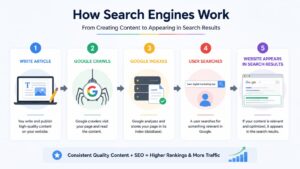
Before exploring advanced concepts of what is SEO, you must understand the simple three-step process search engines follow before displaying your website:
1. Crawling
Google uses automated software programs called crawlers or bots (often called Googlebots).
These bots travel across the internet 24/7, discovering new websites and newly published pages. Whenever you publish a fresh article, Google’s bots eventually visit your site to scan its content.
2. Indexing
After scanning your page, Google decides whether to save that page in its massive digital database. This process is called indexing.
If your article is not indexed, it cannot appear in Google search results. That is why smart bloggers connect their websites with Google Search Console to help Google discover and index new pages faster.
3. Ranking
When a user types a query into Google, the search engine compares thousands of indexed pages related to that query and decides which ones deserve top rankings.
Google considers over 200 factors when ranking pages, including:
- Content quality and depth
- Relevance to search intent
- Website loading speed
- Mobile user experience
- User engagement metrics
- Overall domain trust and authority
The better your content matches what users search for, the higher your chances of ranking near the top.
Why Is SEO Important in 2026?
- Some beginners wonder if learning what is SEO is still necessary because of AI tools, short-form video content, and social media platforms.
The reality is quite the opposite.
Every single day, billions of searches occur on Google. People actively search for direct solutions like: - How to start a blog
- Best laptops for students
- What is affiliate marketing
- How to lose weight safely
- Best AI tools for productivity
- WordPress tutorials for beginners
Whenever someone searches for these terms, Google strives to display the most reliable answer. If your website provides that answer, Google sends targeted traffic directly to your site without you paying a single cent for advertising.
This long-term sustainability is why what is SEO remains a crucial concept today.
Unlike social media posts that vanish from user feeds after a few hours, a well-optimized blog post continues attracting organic visitors for months or even years. Some of my older articles still bring consistent daily traffic long after I stopped active promotion.
The 3 Main Types of SEO
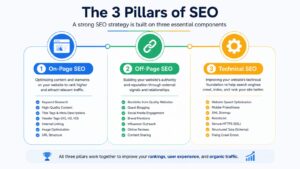
SEO is not just a single action. When analyzing what is SEO, professionals break it down into three core pillars:
1. On-Page SEO
On-Page SEO includes everything you control directly on your website pages.
Key elements include:
- Writing high-quality, comprehensive content
- Structuring text with clear heading tags (H1, H2, H3)
- Adding relevant images with optimized descriptive Alt text
- Optimizing SEO titles and meta descriptions
- Building internal links between related posts
- Improving overall text readability
Every beginner should master On-Page SEO first because you have 100% control over its execution.
2. Off-Page SEO
Off-Page SEO focuses on building your website’s overall authority and trust outside your domain.
The primary component of Off-Page SEO is earning backlinks. A backlink occurs when another reputable website places a link pointing to your content. Google treats quality backlinks as votes of confidence. Earning backlinks naturally through high-value content is far more effective than trying risky link building tactics.
3. Technical SEO
When learning what is SEO, Technical SEO refers to optimizing the backend technical foundation of your site to ensure search crawlers can easily access and index your content.
Key areas include:
- Fast loading speeds
- Fully responsive mobile design
- Secure HTTPS protocol (SSL encryption)
- Valid XML sitemap creation
- Clean website architecture
Modern WordPress themes and plugins automate most technical tasks, so technical SEO should never intimidate you.
Why Every Beginner Should Learn SEO
Understanding what is SEO is not strictly reserved for professional digital marketers; it benefits anyone operating a digital footprint.
Whether you are a:
- Passionate blogger
- Independent freelancer
- Local small business owner
- Content creator or YouTuber
- Affiliate marketer
- Student building an online portfolio
SEO enables target audiences to discover your work naturally without continuous advertising costs. Instead of chasing traffic daily, mastering what is SEO creates an automated traffic engine that works for you around the clock.
How to Do Keyword Research for Beginners
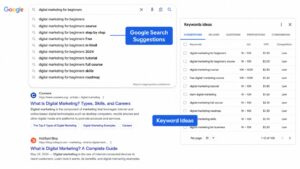
If SEO is the engine that drives web traffic, keywords are the fuel.
A keyword is any word or phrase a user types into Google when seeking information.
For example, terms like:
- what is SEO
- how to start a blog
- best free AI writing tools
- WordPress SEO tutorial
are all targeted keywords.
The objective of keyword research is not to guess what topics sound interesting, but to discover exact terms real people are searching for.
(Note: If you are setting up a fresh site, check out our guide on What Is Blogging? A Complete Beginner’s Guide (2026) to build your foundational structure).
When I launched my blog, I made the mistake of writing articles without checking search demand. Some posts received zero views simply because nobody searched for those topics. Everything changed once I integrated keyword research into my routine.
Simple Keyword Research Process
You do not need expensive paid software to start. These free options work exceptionally well:
- Google Auto-Suggest: Type a seed topic into Google and examine search suggestions.
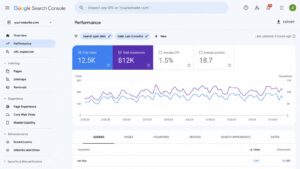
- Google Search Console: Analyzes keywords your published pages already rank for.
- Google Keyword Planner: Explores search volumes and keyword ideas.
- AnswerThePublic: Displays questions users ask around specific topics.
Target keywords featuring decent search volume, lower competition, and clear search intent to give new sites a realistic chance to rank fast.
On-Page SEO Best Practices
 Once you grasp what is SEO conceptually, executing On-Page SEO properly will elevate your rankings.
1. Write Helpful, Intent-Driven Content
Google prioritizes user satisfaction. Before writing, ask yourself: “Will a reader find a complete answer to their question on this page?” Focus on solving problems directly rather than inflating word count artificially.
2. Use Proper Heading Hierarchy
Avoid dense blocks of text. Organize your articles logically:
- H1: Reserved for the primary article title.
- H2: Used for major topic sections.
- H3: Used for subtopics within sections.
This structure enhances user readability and helps Google understand content relationship trees.
3. Keep Paragraphs Short and Readable
Most web users browse via mobile devices. Short paragraphs (2-3 sentences) are easier to scan on small screens, preventing high bounce rates.
4. Image Optimization
Visuals enhance reader engagement. Before uploading images:
- Compress file sizes using web tools to maintain speed.
- Use descriptive file names (e.g., what-is-seo-guide.jpg).
- Always include descriptive Alt Text containing your target keywords naturally.
Technical SEO Made Simple
You do not need to be a software engineer to manage technical SEO basics:
- Site Speed: Slow pages frustrate users. Optimize site performance by using lightweight themes and caching plugins, and measure performance with Google PageSpeed Insights.
- Mobile Responsiveness: Mobile-first indexing means Google evaluates the mobile version of your site primarily. Ensure your design adapts seamlessly across screen sizes.
- HTTPS Security: SSL certificates protect site traffic and build user trust. Ensure your domain uses HTTPS.
- XML Sitemap: An XML sitemap guides Google’s crawlers through your URL structure efficiently. SEO plugins generate this file automatically.
Off-Page SEO & Backlinks Explained
Off-Page SEO relies heavily on establishing digital trust across the broader web.
Google interprets a backlink from an established website as a recommendation. However, link quality outweighs link volume every time. One contextually relevant backlink from an authoritative site carries more value than dozens of spammy directory links.
Safe Strategies to Earn Natural Backlinks:
- Publishing original, data-rich research or comprehensive tutorials.
- Guest blogging on relevant platforms in your niche.
- Creating useful visual assets, infographics, or free templates.
- Building genuine networking relationships with fellow site owners.
Avoid purchasing backlink packages or using automated link building software, as search engines penalize manipulative practices.
Common Beginner SEO Mistakes to Avoid
Understanding what is SEO also involves knowing what not to do:
- Ignoring Search Intent: Writing what you want to say instead of answering what users search for.
- Keyword Stuffing: Repeating target phrases awkwardly disrupts reading flow and leads to search engine penalties.
- Publishing Low-Quality Content: Thin, copied, or unhelpful articles struggle to rank in modern search environments.
- Neglecting Internal Links: Failing to interlink related articles prevents search crawlers from discovering deep content.
- Abandoning Old Content: Outdated information loses rankings over time; review and update existing articles periodically.
Essential Free SEO Tools
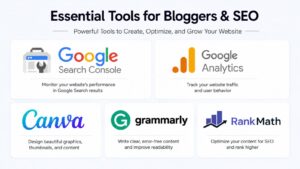
You do not need costly subscriptions to optimize your site effectively. Start with these reliable tools:
- Google Search Console: Tracks search impressions, clicks, indexing issues, and keyword performance.
- Google Analytics: Analyzes site visitor behavior, demographics, and traffic channels.
- Google Keyword Planner: Discovers search volumes and keyword opportunities.
- Google PageSpeed Insights: Diagnoses loading performance issues.
- Rank Math SEO: Guides page-level optimization directly within WordPress.
- Grammarly: Ensures content remains polished, grammatically sound, and readable.
- Canva: Creates professional blog graphics, featured visuals, and diagrams.
Frequently Asked Questions (FAQs)
Is learning what is SEO difficult?
No. The core principles of what is SEO are straightforward to learn. The main challenge lies in applying best practices consistently over time.
How long does SEO take to show results?
SEO is a long-term growth strategy. Fresh websites usually require 3 to 6 months of consistent publishing and optimization before seeing significant organic traffic growth.
Is SEO completely free?
Yes. You can optimize your content, conduct keyword research, and track rankings using free tools without spending money on paid software or ads.
Does SEO still work in 2026?
Absolutely. Billions of searches happen daily on Google. As long as people turn to search engines for information, mastering what is SEO remains essential.
Is SEO better than paid advertising?
Both offer unique benefits. Paid ads deliver instant traffic but stop working the moment your budget runs out. SEO takes time to build, but it generates sustainable organic traffic for years.
Final Thoughts
 When I first started learning what is SEO, I thought it was a complex system filled with secret technical tricks.
After years of practical experience, I realized something far simpler.
SEO is ultimately about helping real people find answers. If your content directly answers genuine questions, loads fast, is easy to read, and provides real value, search engines will naturally recommend it to users.
There are no secret shortcuts or magic formulas. Sustainable growth comes from understanding your target audience, publishing helpful content consistently, and refining your site step by step.
If you are just beginning your online journey, do not try to master every technical detail overnight. Focus on understanding what is SEO, apply basic principles to every post, and publish consistently. Over time, those steady improvements will compound into higher rankings, increased traffic, and long-term online success.
