







What Is SEO? complete beginner guide 2026

Have you ever returns something you were genuinely proud of, clicked the publish button, in the waited… only to realize that almost nobody saw it?
What is SEO? I know that feeling because I have been there.
When I started my first Blog, I believed that writing a good article was enough. I spent hours researching, editing every sentence, making everything look perfect. After publishing, I checked my website several time or day, expecting visitors to appear.
Nothing happened
Days turned into weeks, and my articles barley received any traffic. It first, I thought my writing wasn’t good enough. later, I discovered the real reason.
Google simply didn’t and know my website existed.
That was the first time I had about SEO.
At first, it sounded complicated. Everywhere I looked, people where talking about backlinks, keywords, crawling, indexing, domain authority, and dozens of technical terms that made no since to me.
The truth is, SEO isn’t as confusing as many people make it sound.
Once I understood the basics, everything became much clearer. Instead of guessing what to write, I started creating content that people wear already searching for. Slowly, my article began appearing in Google search the traffic kept Growing month after month.
If you’re new to blogging or you’ve heard the world SEO but never really understood it, this guide will explain everything in simple English.
By the end of this article, you’ll know what SEO is, why it matters, how search engines work and what you should do to help your website appear in Google search results.
What is SEO?
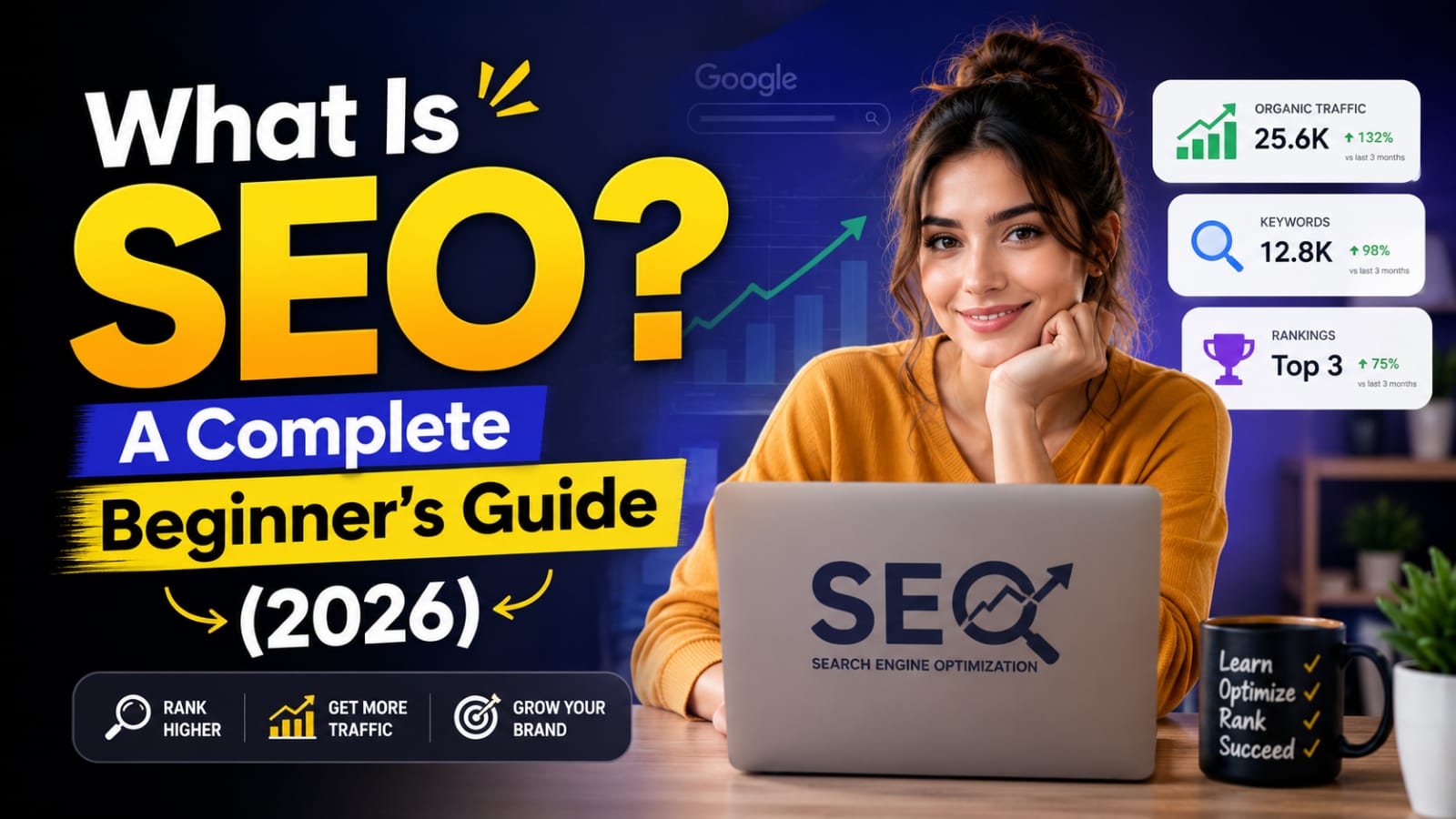
SEO stands for Search Engine optimization.
In simple words, SEO is the process of improving your website so that a search engines like Google can understand your content and show it to people who are searching for information online.
Think of it like opening a small shop in a Huge City.
Even if you are products are amazing, customers won’t find your shop if there are no signs pointing theme in the write direction.
What Is SEO
SEO works like those signs.
If help Google understand:
- what you are website is about
- which questions your content answers
- who should see your pages
- weather your content deserves to rank above other websites
- What is SEO?
Without SEO even A great article can stay hidden for months.
With proper SEO, the same article can continue bringing visitors for years.
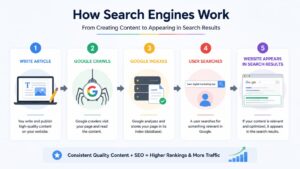
How Do Search Engines Actually Work?
Many beginners imagine Google as a giant computer that magically knows everything.
That’s not how it works.
Search engine follow a simple process before your website appears and search results.
1. Crawling
Google uses automated programs called crawlers or bots.
These bots move across the internet, discovering new websites and new pages every day.
Whenever you publish a new article, Google’s bots eventually visit your website to check it.
2. Indexing
After reading your page, Google decides whether it should save that page in its database.
This process called indexing.
If your article isn’t indexed, it cannot appear in Google search.
That’s why many bloggers connect their website with Google search console, which helps Google discover new pages faster.
3. Ranking
When someone searches for a topic, Google compares thousands of pages related to that such.
Then it choses which pages deserve the top positions.
Google consider many factors, including:
- content quality
- Relevance
- website speed
- Mobile experience
- Users satisfaction
- website trust
The better you are content matches what people are searching for, the better your chances of ranking higher.
Why is SEO important in 2026?
Some people think SEO is becoming less important because of AI tools and social media.
The reality is completely different.
Every single day, billions of searches happen on Google.
People search for things like:
- how to start a blog
- best laptop for student
- what is affiliate marketing
- How to lose weight safely
- Beast Ai tools
- WORDPRESS tutorial
Whenever someone searches for these topics, Google tries to show the most useful answer.
If your website provides that answer, Google can send visitors to your website with out you paying for ads.
That’s one of the biggest reasons SEO is still valuable today.
Unlike social media posts that disappear after a few hours, a well-optimized blog post can continue a receiving visitors for months even years.
Some of my older Articles still bring traffic long after I stopped promoting them.
That’s the power of SEO.
Different types of SEO
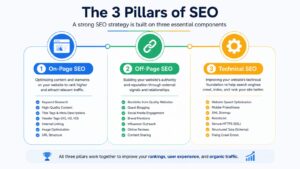
SEO isn’t just one thing.
It is usually divided into three main categories.
Understanding these will make everything else much easier.
1. On-Page SEO
On-Page SEO includes everything you do directly on your website.
For Example:
- writing high quality content
- using proper headings
- adding images
- Optimizing title
- Writing meta descriptions
- Internal linking
- improving readability
This is the type of SEO every beginner should learn first because you have complete control over it.
2. Off-Page SEO
Off-Page SEO focused on building your website’s reputation.
The biggest example is backlink
A backlink is simply another website linking a to your content.
Google often sees quality backlinks is a sign that you are content is trustworthy.
However, earning backlinks naturally is much better than buying theme.
3. Technical SEO
What Is SEO? Technical SEO helps search engines access your website properly.
it includes is things like:
- Fast loading speed
- Mobile-friendly design
- Secure HTTPS connection
- XML sitemap
- Clean website structure
The good news is that modern WORDPRESS, themes, and plugins, handle many of these tasks automatically.
So don’t let the word “technical” scare you.
Why beginners should learn SEO
Learning SEO isn’t only for professional marketers.
It helps almost everyone who has a website.
Whether you are:
- A blogger
- A freelancer
- A small business owner
- A YOUTUBER
- An affiliate marketer
- A student building a portfolio
SEO can help more people discover your Content without spending money on advertising.
Instead of chasing visitors every day, SEO allows visitors to find you naturally through search engines.
That is one of the biggest reasons experienced bloggers continue investing time in learning SEO.
It creates long-term traffic that keeps working even while you’re sleeping.
How to do keyword research
If SEO is the engine that drives traffic, keywords are the fuel
A keyword is the word or phrase that people type into Google when they want to find something.
For example, when someone searches:
- what is SEO
- How to start a blog
- Best Ai tools
- WORDPRESS tutorial
- Affiliate marketing for beginners
These are all keywords.
The goal isn’t to guess what people are searching for. The goal is to find real search terms and create helpful content around them.
When I first started blogging, I made a common mistake. I wrote about topics that interested me without checking if anyone was actually searching for them.
Some articles received almost on visitors because there simply wasn’t enough search demand.
Everything changed once I started researching keywords before writing.
Simple Keyword Research Process
You don’t need Expensive SEO software in the beginning.
These free tools are more than enough:
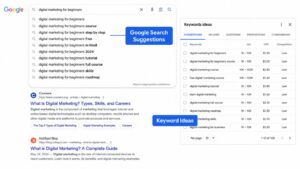
- Google search suggestions
- Google keywords Planner
- Google search console
- Answers the public
Type your topic into Google and look at the suggested searches.
The suggestion come from real users, which means people are already searching for those topics.
Choose keywords that have:
- good search volume
- Lower Competition
- Clear search Intent
This gives new websites a much better chance of ranking.
On-Page SEO Best Practices
On-Page SEO includes everything you can improve on your own website.
It is one of the easiest areas to learn because you control every part of it.
Here are the most important elements.
Write helpful content
Google wants to show content that genuinely helps people.
Before writing an article, ask yourself one questions:
Will someone finish reading this article and find the answer they are looking for ?
If the answer is yes, you are already moving in the right direction.
Focus on solving problems instead of simply increasing word count.
Use clear headings
Large blocks of text difficult to read.
Break your content into section using headings.
For example:
- H1 for the main title
- H2 for Major sections
- H3 for smaller topics
This improves read ability and helps Google understand your content.
Write short Paragraphs
Most people today use mobile phones.
Long paragraphs short and easy to scan feel overwhelming on small screens.
Keep paragraphs short and easy to scan.
This creates a much better reading experience.
Optimize Image
Images make articles easier to understand.
Before uploading images:
- compress the file size
- give the image a descriptive filename
- add rely went alt text
- Use modern formats whenever possible
Optimized images improve page speed and accessibility.
Technical SDO Made Simple
Many beginners a become nervous when the hear the words Technical SEO.
The truth is that most of it is already handled by WORDPRESS and good hosting.
You only need to focus on a few basics.
Websites speed
People don’t like waiting.
If your website takes too long to load, visitors often leave before reading anything.
Fast website provide a better user experience and usually perform better in such results.
Mobile-friendly design
Today, most searches happen on smartphone.
Always check how your website looks on mobile devices.
A responsive design is no longer optional.
It is essential.
HTTP Security
Your website should always use HTTPS instead of HTTP.
A secure website builds trust and protects visitor information.
Most hosting companies provide free SSL certificate.
XML Sitemap
An XML sitemap helps search a beginner discover your pages more efficiently.
SEO plugins like a Rank Math or YOAST SEO automatically generate one.
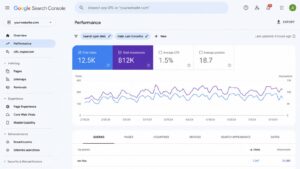
Google search console
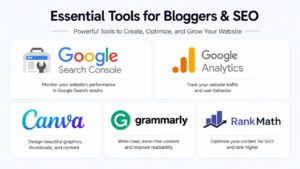
Google search console is one of the most useful free tools available.
it helps you:
- Submit new pages
- Monitor search performance
- find indexing issues
- discover keyboard opportunities
Every website owner should connect their site with search console.
Off-Page SEO Explained
Off-Page SEO focuses on building trust outside your website.
The biggest factor is backlinks.
A backlinks is simply another website linking to your content.
Google often considers backlinks as recommendations.
However, quality matters much more than quantity.
One backlink from a trusted website is usually more valuable than dozens of low quality links.
Some safe ways to earn backlinks include:
- Publishing original content
- Guest blogging
- Sharing research
- Building relationships with other bloggers
Avoid buying backlinks are using simple techniques.
These shortcuts often do more harm than good.
Common SEO mistakes a beginners should avoid
Everyone makes mistakes while learning SEO.
The important thing is to avoid a repeating theme.
Ignoring search Intent
Always understand what users actually want before writing.
If people want a beginner guide, don’t write an advanced tutorial.
Keyword stuffing
Repeating the same keyword over and over makes content difficult to read.
Use you are men keyword naturally.
Google understands context much better than it did years ago.
Publishing low-quality Content
Short, copied, or outdated articles rarely perform well.
Take time to create useful content.
Quality always wins in the long run.
Forgetting internal links
Link related articles together.
Internal links help readers discover more content and improve your website structure.
Not Updating Old Articles
SEO isn’t something you do once.
Update your article regularly with new information.
Fresh content often performs better in search results.
Best free SEO tools for beginners
You don’t need expensive software to improve your SEO.
These free tools are enough for most beginners.
- Google search console
- Google analytics
- Google keyboard Planner
- Google page speed insights
- Answer the public
- Rank Math SEO
- GRAMMARLY
- CANVA
As your website grows, you can explore advanced tools later.
What is SEO is one of the first questions every new blogger asks, and the answer becomes clearer with practice. What is SEO is not about tricks or shortcuts—it’s about creating valuable content that helps users. When you understand what is SEO, you can optimize your website, improve your rankings, and attract consistent organic traffic. Learning what is SEO today will help you build a stronger online presence and achieve long-term success.
Frequently Asked Questions
Is SEO difficult to learn
Not at all.
The basics are easy to understand.
The real challenge is applying them consistently overtime.
HOW long does SEO take?
SEO is a long-term strategy.
New website often take several months before seeing consistent traffic.
Patience is an important part of success.
Is SEO free?
Yes.
You can learn and apply many SEO techniques without spending money.
However, some premium tools can save time as your website grows
Does SEO steel work in 2026?
Absolutely.
Millions of people still search on Google everyday.
As long as people use search engines, SEO will continue to be valuable.
Which is Better SEO Are Paid Advertising?
Both have dear advantages.
Paid ads provide instant traffic, while SEO builds long-term organic traffic that can continue for years.
Many successful website use both Strategies together.
What is SEO? In simple words, SEO is the process of helping your website appear higher in Google search results by creating useful content and following best practices. Learning what is SEO is one of the most valuable skills for bloggers, business owners, and digital marketers in 2026. Once you understand what is SEO, you can improve your website, attract more organic traffic, and build long-term success without relying only on paid advertisements. Every beginner should start by learning what is SEO and then gradually apply SEO techniques to every article they publish.
Final Thoughts

When I first learn about SEO I thought it was a complicated system filled with technical tricks.
After years of blogging, I realized something much simpler.
SEO is really about helping people.
If you are content answers real questions, loads quickly, is easy to read, and provides genuine value, search engines are much more likely to recommend it.
There are no secret shortcuts.
There is no magic formula.
Good SEO comes from understanding your audience, creating a useful content, and improving your website a little at a time
If you’re just starting your blogging a journey, don’t try to master everything in one day.
Learn one concept, apply it, published consistently, and keep improving.
Over time, those small improvements can lead to thousands of visitors, stronger rankings, and long-terms growth.
SEO is not just about ranking higher on Google.
It’s about making your content easier for the right people to find – and that’s what truly matters.
